Stock Takes
A stock take is a physical count of your inventory that is reconciled against the quantities Kitted expects. When you confirm a stock take, any discrepancies are automatically posted as adjustment movements so the system stays in sync with reality.
Starting a Stock Take
Open Stock Takes from the sidebar and click New stock take.
An optional Notes field lets you record a reason or reference (e.g. “End of quarter count” or “Post-audit reconciliation”).
When created, Kitted immediately snapshots the current stock level for every non-archived item at every location. Each snapshot entry becomes a line in the take, carrying an expected quantity equal to the stock level at that moment.
If a stock item has stock at three locations, it will generate three lines - one per location.
Status
| Status | Meaning |
|---|---|
| Open | Count is in progress; no adjustments have been posted yet. |
| Completed | Counts have been confirmed and adjustment movements posted. |
Entering Counts
Open a stock take from the list to reach the detail page. For each line you will see:
| Column | Description |
|---|---|
| Item | Stock item name. |
| SKU | Item SKU, if set. |
| Location | Which location this line covers. |
| Expected | Quantity on record at the moment the take was started. |
| Counted | Input field (open takes) or recorded count (completed). |
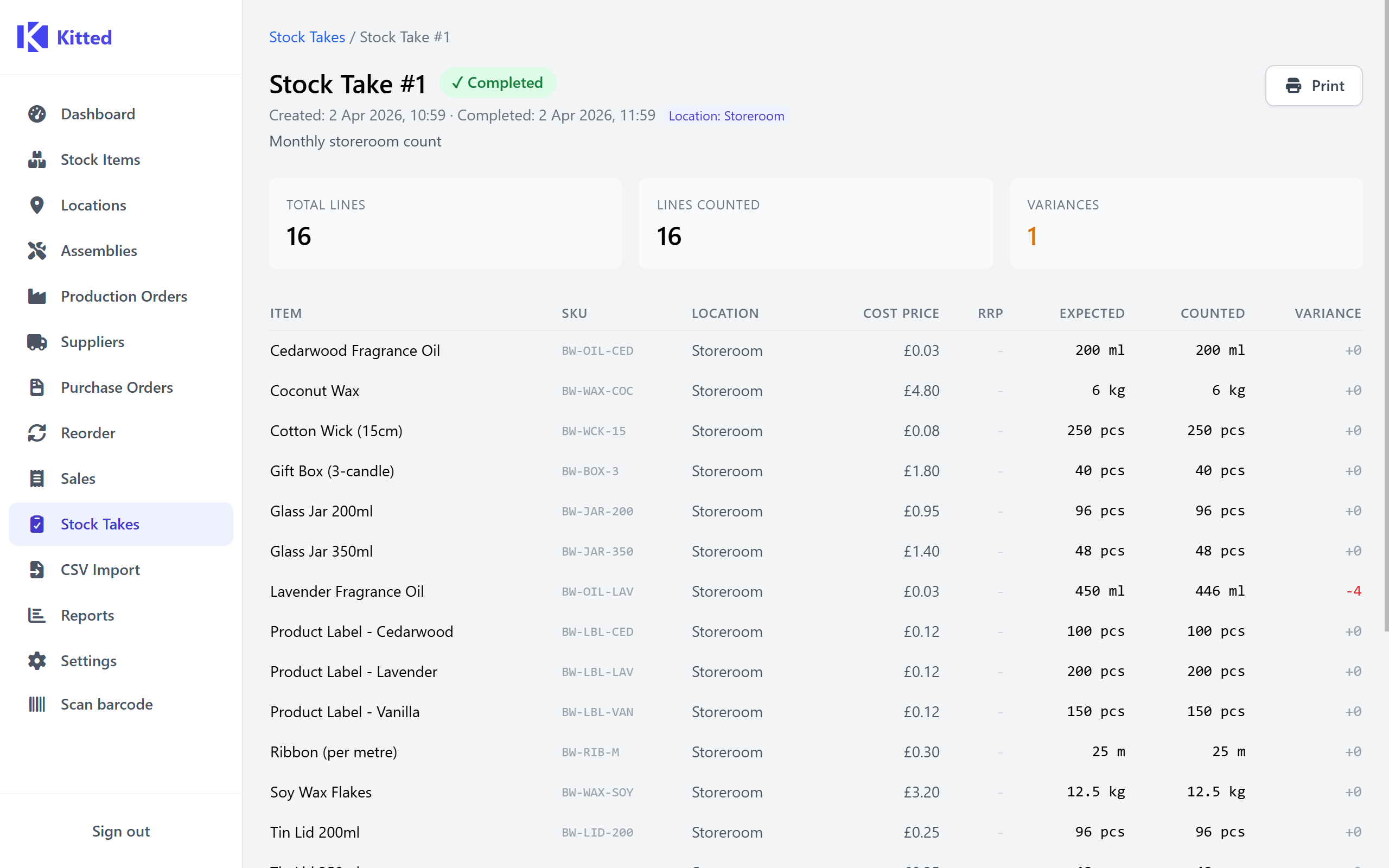
| Variance | counted − expected. Green for surplus, red for deficit, grey for exact match. |
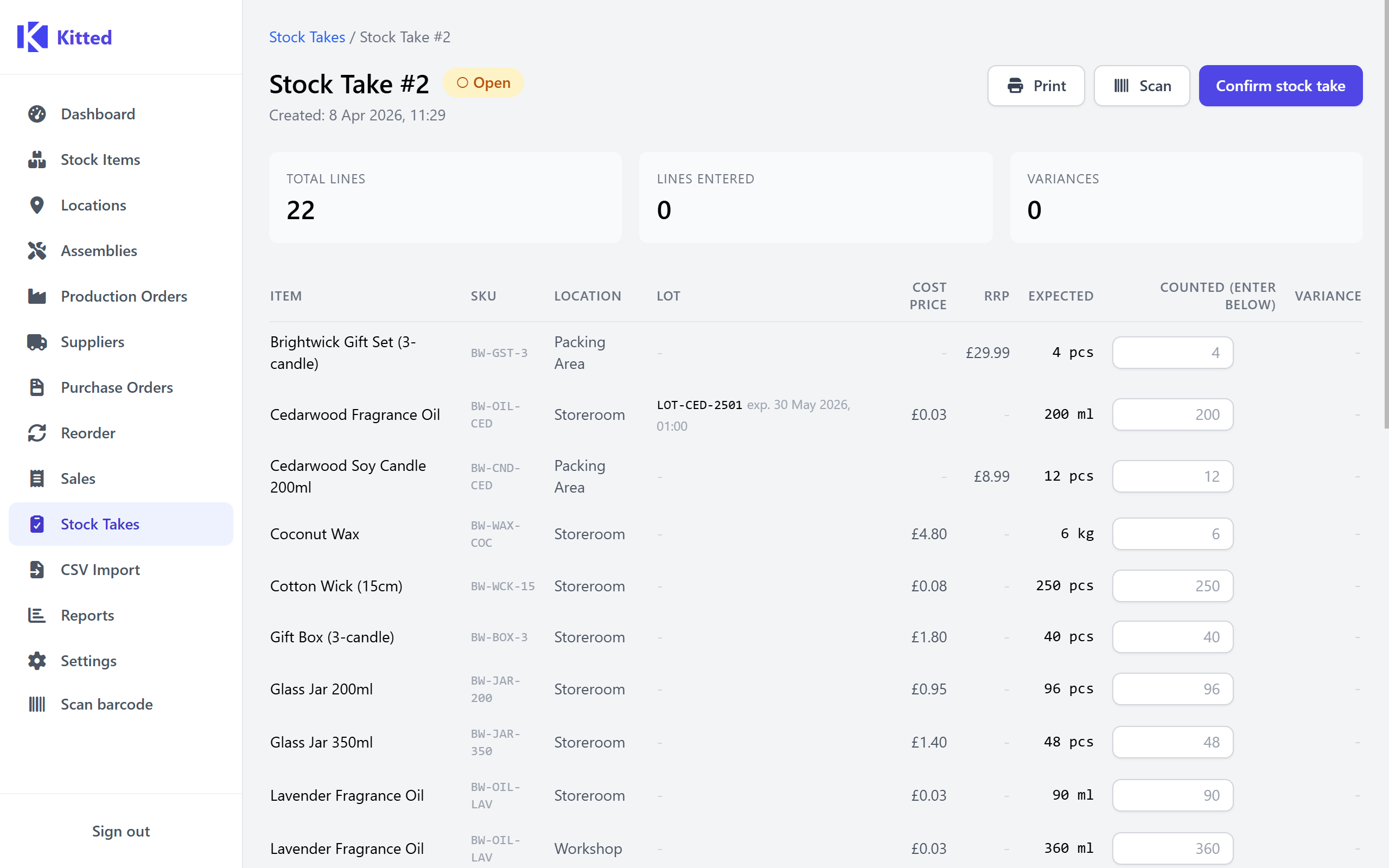
Type your physical count into the Counted field for each line. You can save and return - partial counts are preserved in the page state while it remains open.
A live summary at the top of the page shows:
- Total lines - number of lines in the take.
- Lines entered - lines where you have typed a count.
- Variances - lines where the count differs from the expected quantity.
Lines you leave blank are skipped - no adjustment is posted for them. This is intentional: leave a line blank if you did not count that location rather than entering zero.
Confirming a Stock Take
When you have finished counting, click Confirm stock take (available at the top of the page, and again at the bottom for long lists).
If any lines have no count entered, a confirmation dialog warns you how many will be skipped and asks whether to proceed.
On confirmation, Kitted:
- Saves all entered counts against their lines.
- For every line where
countedQty ≠ expectedQty, calculatesdelta = countedQty − expectedQtyand updates the stock level accordingly. - Posts an adjustment movement for each discrepancy (reason:
Stock take #<id>), creating a full audit trail in Stock Movements. - Lines where no count was entered are left unchanged - no movement is posted.
- Marks the take as Completed with a timestamp.
- Triggers low-stock checks for any items where the adjustment was negative.
Confirmation is irreversible - a completed stock take cannot be re-opened.
Audit Trail
Every adjustment generated by a stock take appears in Stock Movements with type adjustment and a reason of Stock take #<id>. You can filter movements by type to review the full history of stock take corrections.